How to use User Offset Correction on PicoScope Oscilloscopes
All oscilloscopes can drift over time and under different ambient temperatures appearing as a small voltage offset on each channel. This can be frustrating as a slight drift can produce inaccurate results. This article explains User Offset Correction, when and how to perform the correction to provide more accurate results on oscilloscope measurements and a troubleshooting guide to overcome common issues. User Offset Correction is available in PicoScope 7 software versions later than 7.2.19 and currently available on PicoScope 3000E Series Oscilloscope.
What is User Offset Correction?
User Offset Correction is a hardware-level feature on many oscilloscopes designed to eliminate electrical “drift” or unwanted voltage offsets that can accumulate across all channels. Over time, these small deviations can affect the accuracy of your readings, making a signal appear higher or lower than its true value.
As the correction is implemented in hardware, it does not reduce the device’s available measurement range, unlike Zero Offset in PicoScope 7 Software. User Offset Correction is saved directly to the PicoScope Oscilloscope and will remain consistent across PicoScope 7, PicoSDK and on different PCs.
It is important to remove internal offsets before testing a device to ensure the best possible measurement accuracy. User Offset Correction is designed specifically for this purpose. If, however, the offset originates from the circuit you are measuring, you should use Zero Offset correction instead. Never use User Offset Correction to remove errors other than those internal to the scope.
When Should You Perform a User Offset Correction
It is recommended that you perform this correction regularly to ensure measurement integrity. Specific triggers include:
When there is a visible offset noticed on a channel/range (with the inputs terminated).
Before the unit is sent off for 3rd party calibration.
How To Apply User Offset Correction In PicoScope 7 Software?
The correction process is managed through a new Device tab within PicoScope 7 Software settings.
1.Ensure the PicoScope has been powered on for at least 30 minutes before starting.
2.Remove all probes, cables, and accessories from every channel input.
3.Open the settings menu and select the Device tab.
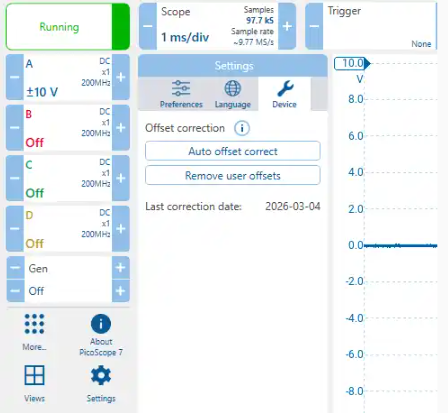
4. Press ‘Auto offset correct’ and follow the on-screen prompts.
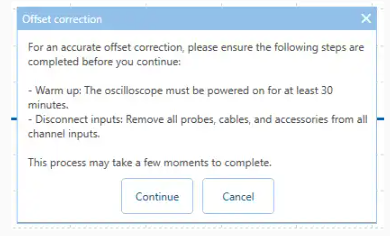
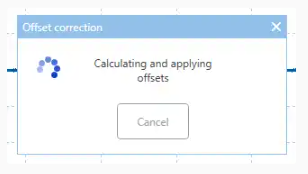
5. Once complete, the date of the correction will be displayed in the Device tab and the About dialog.
To revert to factory defaults, you can select ‘Remove user offsets’ at any time to clear the applied values and dates from the device.
What are common User Offset Correction errors and how to fix them?
If the process fails, you may encounter one of the following messages:
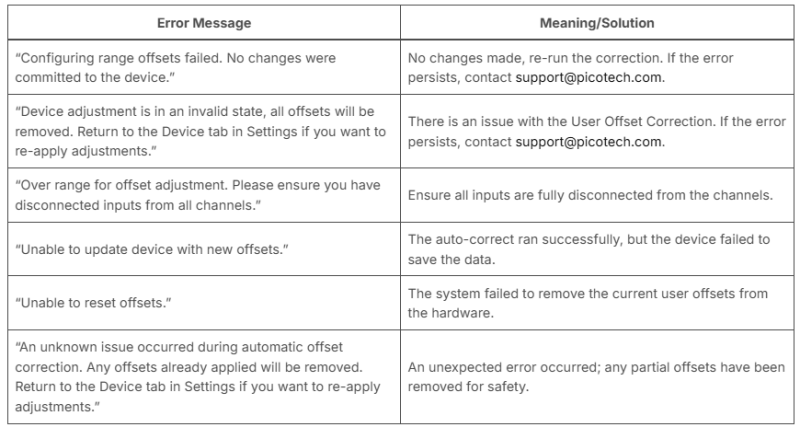
PicoScope 3000E Series Oscilloscopes
View our PicoScope 3000E Series including the User Offset Correction feature.
View Products
Frequently Asked Questions
How do I know if my PicoScope has a User Offset Correction?
Once the PicoScope has been connected to the PC and PicoScope 7 is open, navigate to the Settings lozenge, then Device tab. This will display the “Last correction date” which is the last date the PicoScope was corrected and that is saved to the device.
How Can I Remove My User Offset Correction?
In the same Device tab, you can click the “Remove user offsets” button which will remove any user offset and remove the Last correction date. Use this if a correction has been performed incorrectly or if the device needs to be reset back to factory calibrated settings.
Supported Products
Currently User Offset Correction is only available on the following product:
PicoScope 3000E Series
PicoScope 5000E Series
PicoScope 6000E Series (as of PicoScope 7, version 7.2.24)