PicoScope USB Cable and Connector Guide
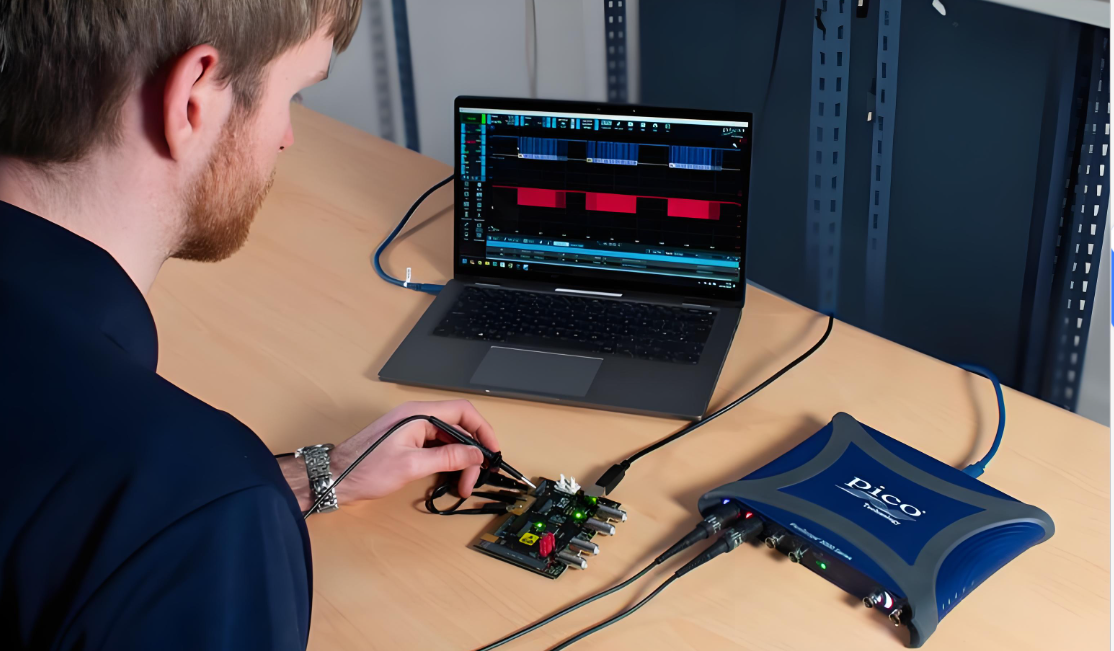
If you are experiencing data dropouts, slow streaming speeds or connection failures, you may be using an unreliable third-party oscilloscope USB cable. We solve this communication bottleneck by supplying custom-engineered blue PicoScope USB cables with every device. While high-speed data transfer and streaming bandwidth rely on premium shielding to prevent electrical noise, our extra-thick internal power and ground cores prevent voltage drops. Standard consumer cables use thin power lines that cause power supply starvation, which leads to sudden disconnects.
To guarantee measurement integrity and keep your hardware operating at its full potential, order your replacement cable directly from us.
Pico USB cables at a glance:
Speed: Supports high data rates up to 480 Mb/s (USB 2.0) or 5 Gb/s (USB 3.x) depending on the model.
Supply: Every new Pico product always comes supplied with a suitable USB cable.
Technology: Premium shielded cables with extra-thick power and ground cores.
Goal: Prevents data dropouts and connection failures during deep-memory captures.
Compliance: Strictly requires the original Pico-supplied cable or official replacements.
Why Is Using The Correct USB Cable Important?
Using the correct USB cable is important because it directly impacts your data throughput, real-time sampling rates and overall system reliability during deep-memory waveform captures. Standard consumer-grade USB cables often lack the dense copper shielding and thick internal power lines required by sensitive measurement instruments. Without these premium design features, you are highly likely to experience electrical noise, communication disconnects or power supply starvation.
To ensure stable data transfer, your cable and host PC port must meet or exceed the maximum transfer speed of your specific Pico product. Depending on your model, this will require a connection capable of either 480 Mb/s (USB 2.0) or 5 Gb/s (USB 3.x SuperSpeed) to prevent data bottlenecks.
How Do I Choose The Correct USB Cable For My Pico Product?
To choose the correct USB cable, you must follow these simple step-by-step instructions:
Check the physical connector on your host PC (typically USB-A or USB-C®).
Inspect the rear of your Pico product to identify its device-side connector port.
Confirm the exact model number or series of your Pico device.
Cross-reference these details with the lookup table on this page to find your matching replacement cable code.
How Do I Identify My Pico Product USB Connector?
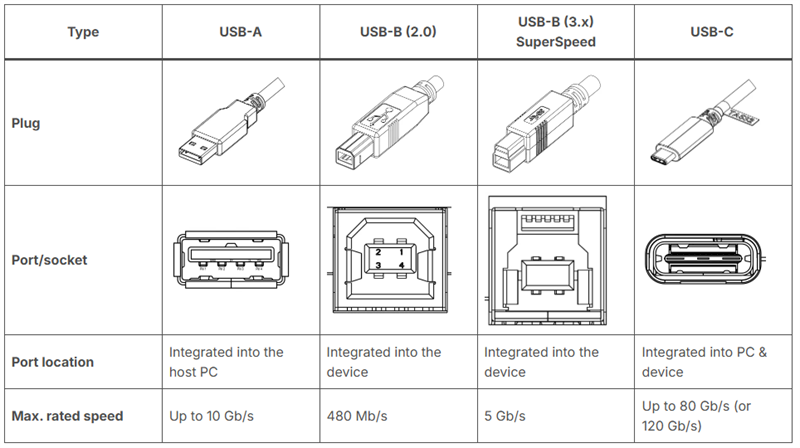
You can identify your USB connector by verifying the layout dimensions, internal plastic isolation colors and port geometry on the rear panel of your device.
The table below describes the physical properties of the standard USB interfaces used across our product ranges:
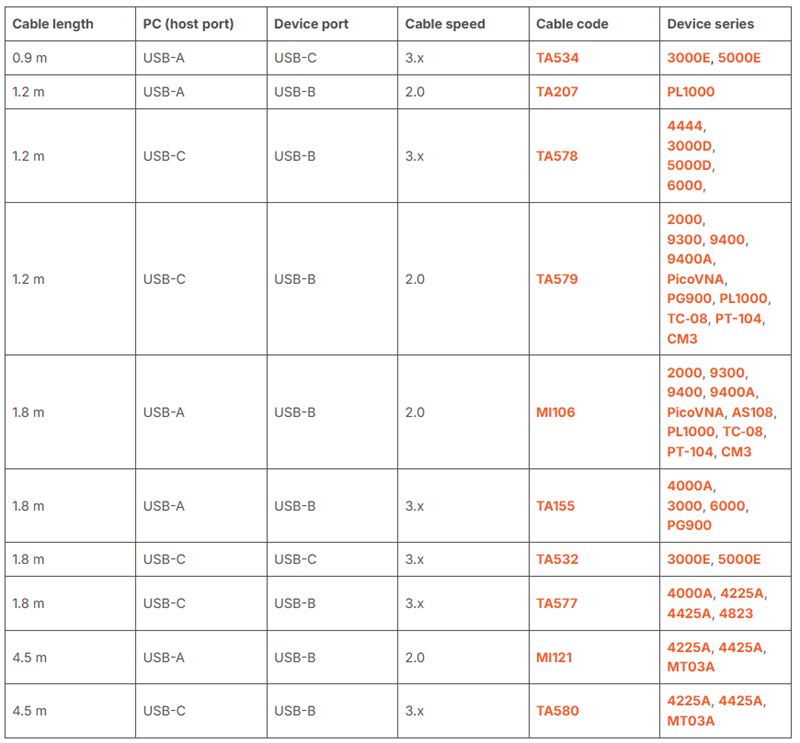
Which PicoScope Replacement USB Cable Do I Need?
To find the exact PicoScope replacement cable for your device, locate your model series in the lookup table below. Ordering the precise cable code that was originally supplied with your unit guarantees hardware compatibility and prevents performance bottlenecks:
FAQs
Can I use a standard USB cable with my PicoScope?
No, you cannot use a standard USB cable with your PicoScope because standard consumer cables lack the required shielding and extra-thick power and ground cores. Using third-party cables is one of the most common causes of reliability issues, including data dropouts and compromised hardware performance. Our cables are specifically manufactured to handle high streaming bandwidths and ensure proper grounding.
What happens if I use a slower USB port or cable with my Pico product?
If you use a slower USB port or cable (such as 480 Mb/s) with a Pico product that supports a faster speed (such as 5 Gb/s), the device will still safely power on and work. However, your performance will be compromised. This mismatch will strictly limit your streaming performance, resulting in slower waveform update rates, reduced streaming speeds and increased wait times when saving waveforms.
Does USB cable length affect performance?
Yes, USB cable length affects performance because longer cables can cause voltage drops, especially when using non-Pico cables. The longest cables cannot reliably support high data rates over extended distances, which is why our 4.5 m cables are restricted to USB 2.0 speeds.
Why isn’t my PicoScope recognized over a USB 3.0 connection?
Your PicoScope isn’t recognized over a USB 3.0 connection if the port provides insufficient power, you use a non-compliant USB-B (3.x) cable or you have outdated USB host controller drivers.
If you have any questions about choosing or using Pico oscilloscopes, welcome to contact Yiji Technology.