How To Choose Between 12-Bit Vs 16-Bit Oscilloscope Resolution
Picking between a 12-bit vs 16-bit oscilloscope resolution isn’t about grabbing the biggest number on the datasheet. It’s about matching the oscilloscope resolution to the signal in front of you. More bits give you finer vertical detail, so the small details riding on a signal show up. Fewer bits often buy you faster sampling and wider bandwidth. Get that balance right and you capture exactly what you need, without paying extra for resolution and performance you’ll never use. Once you know how resolution works and where each level earns its keep, choosing the right PicoScope Oscilloscope is straightforward.
What Is Oscilloscope Resolution?
Oscilloscope resolution is the bit depth of the analog-to-digital converter (ADC), which sets how many vertical levels the scope has to digitize your signal. The ADC takes the input and maps it to the nearest available level. More levels mean smaller vertical steps, so you can identify finer changes in the signal. A 12-bit scope splits its input range into 4,096 levels, and a 16-bit scope into 65,536. Same input range, very different detail.
How Does Oscilloscope ADC Resolution Work?
Vertical resolution scales exponentially with bit depth. Every extra bit doubles the number of vertical levels the ADC can resolve, following 2 to the power of n, where n is the number of bits. That is why the step from 12-bit to 16-bit oscilloscope resolution does far more than the numbers suggest. From the input to a trace on screen, your signal moves through a few stages:
1、Signal conditioning: the analog front-end scales and cleans up the incoming voltage.
2、Sampling: the hardware ADC samples the signal at full speed.
3、Quantisation: each sample is mapped to the nearest vertical level, set by the bit depth (2 to the power of n).
4、Least significant bit (LSB): the smallest vertical step the scope can resolve, which depends on the input range you have selected.
5、Reconstruction: the software draws the continuous trace, with less quantisation noise the more levels you have to work with.
The LSB is where resolution adds value. Take a 10 V full scale (±5 V range): divide it by the number of levels and you get the smallest vertical step the scope can see. On 12-bit, that step is 2.4 mV and on 16-bit, roughly 150 µV. Same range, and the detail you can resolve 16 times.
When Should You Use A 12-Bit Oscilloscope?
A 12-bit oscilloscope is the right tool for a large share of everyday design and debug work, and often the smarter choice. With 4,096 vertical levels, it resolves details that an 8-bit scope flattens, and because high-resolution ADCs are harder to run at high speed, 12-bit designs typically offer higher sample rates and bandwidth.
Choose a 12-bit oscilloscope when you are:
Debugging general analog and mixed-signal designs
Chasing timing and edges on faster signals, where bandwidth matters more than millivolt precision
Testing standard sensors and power rails, where the detail you need sits comfortably above the noise
Working across a wide voltage range without hunting for microvolt-level features
If your signals live well above the quantisation floor, 12-bit gives you the detail you need and the speed to go with it.
When Should You Use A 16-Bit Oscilloscope?
Step up to a 16-bit oscilloscope when you need to see microvolt-level detail or wide dynamic-range signals that would otherwise disappear into quantisation noise. With 65,536 levels, a 16-bit oscilloscope isn’t a third better than a 12-bit one, as the numbers suggest; it resolves 16 times finer than 12-bit, and 256 times finer than 8-bit.
That extra precision of a 16-bit oscilloscope earns its place in work like:
Power integrity: viewing millivolt ripple and load-step droop on a 1.8 V or 3.3 V rail while DC-coupled, so the absolute rail level stays in view. With analog offset on the ±500 mV or ±1 V range, a 16-bit scope resolves 15–31 µV steps, against 244–488 µV on 12-bit.
Biosignals and low-voltage sensors: ECG electrodes and transducers produce millivolt-level signals whose true shape, noise and anomalies only show up with fine vertical detail.
Electrochemistry and battery testing: mapping small, gradual voltage plateaus and self-discharge curves needs vertical step density that a 12-bit scope can’t provide over a long test.
Audio and vibration FFT: the low-level harmonics you chase for total harmonic distortion (THD) often sit below the noise floor of a 12-bit scope. 16-bit pushes that floor down and exposes them.
One thing worth knowing: there are two ways to reach 16 bits. A native 16-bit ADC resolution digitizes in hardware, so you keep your sample rate and bandwidth. Software resolution enhancement averages an 8- or 12-bit capture after the fact, which applies a moving-average filter that lowers effective bandwidth, softens fast edges and can hide narrow glitches. No amount of bits helps if the front-end is noisy. Extra resolution only counts when it sits above the scope’s own noise floor. For more information on how to reduce oscilloscope noise, please visit our Knowledge Base on noise reduction.
12-Bit Vs 16-Bit Oscilloscope Resolution: How Do They Compare
A 16-bit scope doesn’t seem a third more than a 12-bit one, the way the numbers 12 and 16 imply. It resolves 16 times finer, a 256-fold jump in detail over 8-bit.
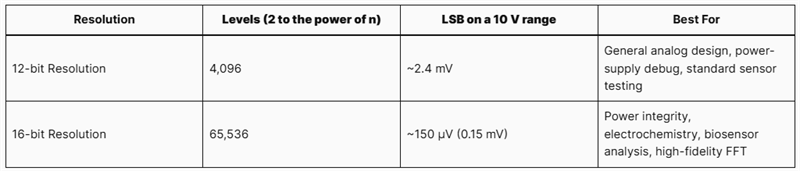
The trade-off runs the other way too: the higher the resolution, the harder the ADC works, so a native, high-resolution front-end matters if you want that precision without giving up speed.
Which PicoScope Oscilloscopes Offer 12-Bit Or 16-Bit Resolution?
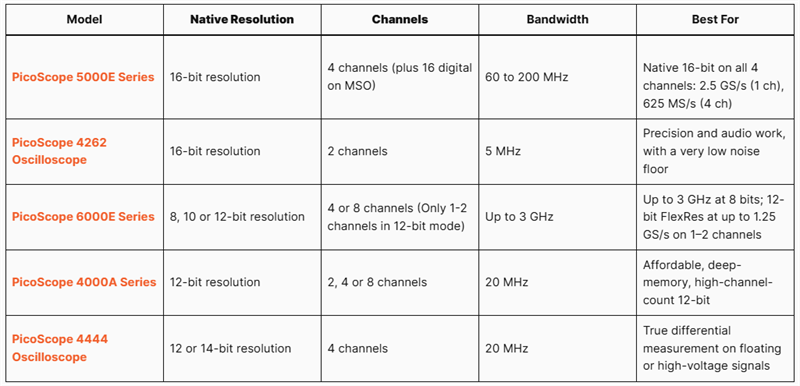
Our PicoScope Oscilloscopes cover 12-bit and 16-bit resolution, so you can pick the depth your work needs without compromising on the rest of the spec. See the table below to compare our products.
FAQs
What Is The Difference Between A 16-Bit ADC Resolution And Software Resolution Enhancement?
A native, 16-bit ADC resolution digitizes your signal with true 16-bit hardware converters on the board, so you keep the full sample rate and bandwidth. Software resolution enhancement takes an 8- or 12-bit capture and applies a moving-average filter afterwards. It smooths the trace, but it trades away active sample rate and bandwidth to do it.
Does Higher Resolution Reduce Sample Rate Or Bandwidth?
A higher resolution can reduce sample rate and bandwidth. Higher resolution asks more of the ADC, so on some architectures the maximum sample rate drops as you add bits, and in some cases the channel count drops too. A native high-resolution front-end is built to hold onto sample rate and bandwidth while still resolving fine detail, which is why the architecture matters as much as the bit number.
Why Does A Quiet Front-End Matter For High-Resolution Work?
Extra resolution bits only carry real signal information if they sit above the scope’s own noise floor. If the instrument’s internal noise is larger than the detail you are chasing, the lowest bits just digitize that noise, and the high resolution buys you nothing. A quiet analog front-end is what lets those bits do useful work. The PicoScope 5000E Series has an ultra-low noise floor of just 22 µV RMS applied on the ±5 and ±10 mV ranges at 20 MHz bandwidth, and Over 73 dB SFDR applied at 1 MHz, −2 dBFS, on the ±50 mV to ±20 V ranges. Learn more on choosing the right hardware for high-resolution vs high-speed measurements. Alternatively, explore our noise reduction techniques in PicoScope 7 Software, or visit our noise reduction Knowledge Base.
Can Software Boost An 8-Bit Oscilloscope To 16-Bit?
No. Resolution enhancement in PicoScope 7 adds up to 4 bits, so an 8-bit capture reaches 12 bits at most.